One document.
One PDF per aircraft.
Write your QRH, MEL or aircraft operations manual once for the type. Every aircraft gets its own PDF, holding only the procedures its fitted options allow — built at export, never maintained by hand.
No two aircraft are configured alike
So the document that is correct for one of them is wrong for the next. Keeping a copy per aircraft is how fleets lose control of their documentation.
Copies drift apart
A document duplicated per aircraft starts identical and never stays that way. Every edit made after the copy is an edit somebody has to remember to repeat.
Procedures for options that are not fitted
A hoist procedure in the PDF of an aircraft not fitted with one is not a typo. It is a procedure the crew cannot carry out.
One revision, every copy
Change a single step and the work is not the change. It is finding every document that carries it, and proving you found them all.
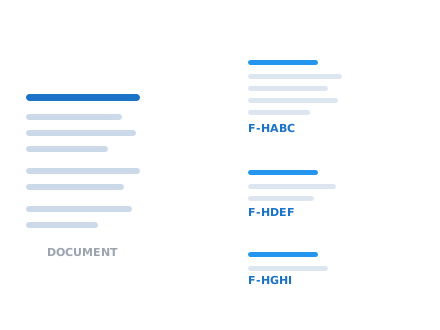
Two aircraft. Two different PDFs. No second copy.
F-HABC is fitted with a hoist, F-HDEF is not. The hoist procedure is written once and reaches only the aircraft that can perform it.
What is fitted decides what prints
You describe the fleet once. Each procedure states what it needs fitted. At export, every aircraft receives only the procedures it can actually use.
Options, named once
Hoists, EMS kits, slings — named once for the whole fleet, so each means the same thing on every type.
What a model can carry
A type, and the options its aircraft can be fitted with.
What is fitted to each aircraft
One row per registration, ticking only what is actually fitted.
Procedures state what they need
Written once, for the type — each step declaring what it needs fitted.
One PDF per aircraft
Generated on demand, each holding only what that aircraft can use.
A procedure that requires a hoist appears only in the PDF of an aircraft fitted with one. Nobody edits a second copy to make that true.
QRH, MEL and aircraft operations manuals
Any document whose content depends on how each aircraft is configured. What the document is called does not matter — what matters is which options each procedure needs.
QRH
Quick reference handbookEmergency and abnormal procedures, filtered so a crew is never issued a procedure their aircraft cannot carry out.
MEL
Minimum equipment listWhat may be inoperative on each aircraft, without keeping a separate list per registration.
Aircraft operations manual
Type operating proceduresWritten once for the type, issued per aircraft with only its fitted options and its own values printed in.
Maintenance procedures
Task cards and servicingSteps that reach only the aircraft fitted with the options they describe.
Built for aviation document control
Single-sourced procedures
A procedure lives in one place and is linked into every document that needs it. Edit it once and every document carrying it is already current — there is no second copy to find.
Per-aircraft variables
Write {aircraft_name} or {msn} into a procedure. Each aircraft's values are substituted as its PDF is produced.
Checks before you export
The editor tells you while you write: which options a procedure needs that no aircraft is fitted with, and which aircraft would receive a PDF with nothing in it.
A PDF for every aircraft
Export the document and each aircraft of that type gets its own PDF, with your header, footer and cover page. Retired aircraft are left out.
Questions operators ask first
Is this an S1000D system?
No. Sonat does not implement S1000D — there is no CSDB, no data modules and no BREX. If your programme is contractually required to deliver S1000D, you need a technical publications suite built for it. If what you need is one document per type, a PDF per aircraft, and procedures that stay in step, this does that with far less to run.
How is this different from a document management system?
A document management system stores and versions documents you have already produced. Here, an aircraft's document is not a stored file at all — it is built at export from how that aircraft is configured. There is no per-aircraft copy to keep in step, because there is no per-aircraft copy.
Does it work for airlines as well as helicopter operators?
Yes. The model is a type, the aircraft registered against it, and what each one is fitted with — which is how any operator describes a fleet, fixed-wing or rotary.
What happens if a procedure needs an option no aircraft is fitted with?
The editor tells you before you export. It lists the options your document requires that no aircraft carries, the options fitted across the fleet that no procedure covers, and any aircraft that would receive a PDF with nothing in it at all.
When a procedure changes, what has to be reissued?
Nothing has to be found first. A procedure is stored once and linked into every document that uses it, so editing it updates every document carrying it. The work is the change itself, not the search for every copy of it.
Set it up around your fleet
The aviation add-on is enabled per account. Tell us how your fleet is configured and we will set it up with you.